Ads 468x60px

Cliksor

Senin, 26 Maret 2012

Trik Tingkatkan Penghasilan Google Adsense

Trik Tingkatkan Pengahasilan Google Adsense - Setelah artikel sebelumnya membahas trik cepat di Approve Google Adsense, pada trik kali ini saya akan menerangkan bagaimana mengoptimalkan google adsense pada blog sobat. Mengutip artikel dari official Blog Google adsense,berikut ini adalah beberapa trik peletakan posisi adsense di blog untuk meningkatkan penghasilan dari klik adsense anda
Google AdSense is a free program from google to maximize revenue from your online content that empowers online publishers to earn revenue by displaying relevant ads on a wide variety of online content, including:
  • Site search results

    Easily add a custom search engine to your site, and earn from ads on the search results pages.
  • Websites

    Display ads on your website that are suited to your audience's interests, and earn from valid clicks or impressions.
  • Mobile webpages and apps

    Connect your mobile users with the right ad at the right time as they seek information on the go.
  • Feeds

    Display targeted ads in your RSS feeds, wherever they're viewed.
     
       
Now I will give trick and tips in video how to increase your google adsense in your site. This video create by the official adsense team.
The AdSense team has posted a six-part video series, with Top optimization tips and best practices that can help you in boosting the eCPM and revenue of your Adsense. Implementing these techniques into your website and Adsense ad layouts can help you in monetizing your traffic and let you quickly earn more revenue online.


Berikut ini Adalah Video Trik-Tips untuk meningkatkan penghasilan Google Adsense Anda. Video ini di posting oleh Tim Adsense dari Google, silakan disimak dan tingkatkan penghasilan adsense anda

1. Upgrade to high-performing units
 

 2. Monetize more content
 

3. Optimize search box placement
 

4. Opt-in to text and image ads
 

5. Use link units


6. Opt-in to placement targeting
 

Cara Mudah Mengganti Favicon Blogger Tanpa Mengedit HTML

Mengganti Favicon, mungkin sudah banyak yang tahu caranya, dan blog-triks juga pernah memaparkan caranya disini. Mengapa saya membahasnya lagi? Karena kali ini cara yang akan saya paparkan berbeda, ini lebih mudah dari cara mengganti favicon yang sebelumnya saya tulis disini. Panggantian favicon yang akan saya jelaskan disini tanpa melalui editing HTML, melainkan langsung dari fitur yang dimiliki blogger. Tak usah belama-lama, langsung akan saya jelaskan caranya secara lengkap, silakan disimak :)


  1. Masuk halaman Blogger in Draft, silakan login dengan akun blogger sobat
  2. Di halaman utama terdapat daftar blog sobat, silakan klik Dashboard pada blog yang akan diedit faviconnya


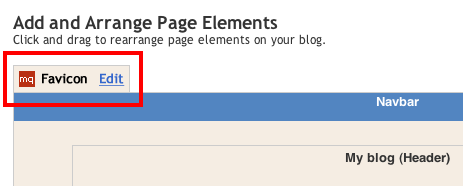
  3. Kemudian klik Edit pada elemen Favicon Setting yang terletak diatas elamen navbar


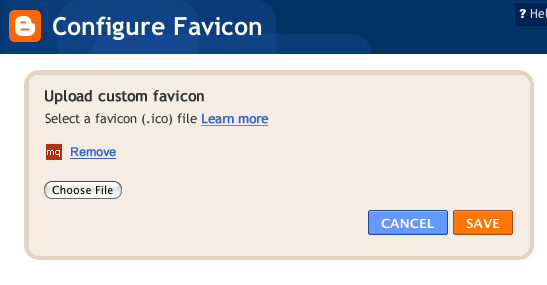
  4. Akan muncul window baru, yaitu window favicon configuration

  5. Silakan sobat pilih file icon yang ingin dipasang, gunakan file dengan ekstensi .ico karena file yang support adalah file icon .ico . Bagi sobat blogger ingin mengkonversi file JPG, PNG atau file lain ke .ICO dapat sobat lakukan di http://www.icoconverter.com/ atau situs konversi lainnya

  6. Setelah itu klik Save untuk menyimpan setting yang telah dilakukan


  7. Selesai, coba sobat buka blognya, dan favicon sudah berubah susai yang diganti tadi :)

Cara gampang Membuat Banner blogger

Membuat banner (Link Baner) sangat mudah, itu menurut orang2 yang mengerti software desain, tapi sulit menurut kita yang awam terhadap software2 desain tersebut. tapi dunia sudahcanggih sobat, jangan khawatir banyak cara yang memudahkan kita untuk menyelesikan berbagai kesulitan kita. nah berikut cara yang mudah untuk membuat link banner.ikuti petunjuk di bawah ini!

  1. Bukalah situs http://cooltext.com
  2.  Disana nanti akan langsung terpampang macam-macam banner yang disediakan. tinggal pilih sesuai selera.
  3. kemudian akan muncul fomr untuk menstting banner yang di pilih tadi. diantaranya settingan warna,ukuran,jenis huruf, dan lain2.
  4. Jika sudah sesuai keinginan klik tombol "Rander Logo"
  5. Tunggu sebentar sampai proses rendering selesai.
  6. Jadi deh banner blog sobat, tapi jika belum cocok coba lagi aja sampai mendapatkan hasil yang sesuai keinginan.
  7. Download Image, lalu simpan banner sobat itu
Langkah selanjutnya supaya bannernya bisa sobat pasang di blogger yaitu dengan menguplaod file tadi ke webhosting. bisa menguplaodnya di

http://www.photobucket.com
http://www.ripway.com
http://tinypic.com
Nanti sobat akan mendapat link untuk banner kesayangan sobat.

Sabtu, 10 Maret 2012

Cheat Point Blank

09/03/2012 - WALLHACK + AUTO HEATSHOT


 Baca dolo petunjuk di injector ;sebelum menggunakan ???!!!
Hotkey :
- Insert [ untuk buka tutup menu ]
- Panah atas/bawah,untuk memilih
- Panah kiri/kanan,untuk ON/OFF


Total Overdose PS2 Mediafire


PlayStation 2
Publisher: SCi Games / Eidos Interactive
Developer: Deadline Games
Genre(s): Action, Adventure
Release Date: September 27, 2005


Deep in the heart of the Mexican jungle, undercover agent Ernesto Cruz blasts his way through an armed militia to board a DEA plane bound for home. He never made it, the victim of an alleged 'overdose'. Present Day: After uncovering new evidence, Ernesto's son, Ramiro is set free from jail to join his twin brother Tommy, on the trail of their father’s killer as they go on a super-cool, tequila fuelled rampage through Mexico’s gun-toting, drug-pushing underworld. Features: A Rich storyline taking the player through 18 different environments, from the seedy red light district of Los Toros, to the depths of the Mexican desert. A free-style combat and stunt system to take down your enemy with more outrageous moves than you can shake a hot chilli at. Cutting edge soundtrack featuring Molotov, Delinquent Habits, Control Machete


Download Link


http://www.mediafire.com/?wzkzrtmmnno
http://www.mediafire.com/?x0innkznoyj
http://www.mediafire.com/?nd4hzonwmzj
http://www.mediafire.com/?ydigmtzzdwm
http://www.mediafire.com/?ijtmmocmzmy
http://www.mediafire.com/?wmmqno3tmhj
http://www.mediafire.com/?wng4zgg3qjh
http://www.mediafire.com/?ezgmtlwmmzm
http://www.mediafire.com/?ignwyj3dyfy
http://www.mediafire.com/?rwtjmn2nnmq
http://www.mediafire.com/?gnazr3jzgid
http://www.mediafire.com/?gntzzi1znwz
http://www.mediafire.com/?ngzmmnwzmmc
http://www.mediafire.com/?iyljlm1wdm5
http://www.mediafire.com/?1z5jyymlm4t
http://www.mediafire.com/?2y2oyg3mmzg

Need For Speed The Run FulRip + Reloaded


Need For Speed The Run FulRip + Reloaded

- Unrar All Parts
- Start Installation setup.bat Then Play

Minimum System Requirement

OS: Windows Vista SP2 or Windows 7
CPU: 2.4 GHz Intel Core 2 Duo or equal AMD
RAM: 3 GB
HDD: 18 GB free disk space
Graphics: 512 MB Graphics Memory
DirectX: Version 10

Recommended System Requirements

OS: Windows Vista SP2 or Windows 7
CPU: 3.0 GHz Intel Core 2 Quad or similar
RAM: 4 GB
HDD: 18 GB free disk space
Graphics: 1 GB Graphics Memory
DirectX: Version 10/11

Screens:


Mediafire Pass : mediafire-games4u

Heavy Fire Afghanistan FullRip & Repack & SkidRow


Heavy Fire Afghanistan FullRip & Repack & SkidRow

Publisher : Mastiff
Developer : No Company
Genre : Action
Release Date : Feb 22, 2012
ESRB : Teen
ESRB Descriptors : Violence, Mild Language

Minimum System requirements

System: Windows XP SP3 / Windows Vista / Windows 7;
Processo Intel Pentium D 3.0 GHz / AMD Athlon 64 X2 4400 +;
Memory: 1.5 GB;
Video: NVIDIA GeForce 8600 GT / ATI Radeon HD 2600 XT with 256 Mb;
Hard disk space: ~ 7 Gb

Recommended System requirements

System: Windows XP SP3 / Windows Vista / Windows 7;
Processo Intel Core 2 Duo / AMD Athlon Dual Core equivalent;
Memory: 3.0 GB;
Video: NVIDIA GeForce GT 220 / ATI Radeon HD 3450 with 512 Mb;
Hard disk space: ~ 7 Gb

Start Installation Game FullRip

Unrar All Parts
Start Setup From Unpack.bat
Play From desktop

Start Installation Game Repack

Unrar All Parts
Mount or burn image
Start Setup From Setup.exe
Play From desktop

Start Installation Game Skidrow

Unrar All Parts
Mount or burn image
Start Setup From Setup.exe
Play From desktop

Screensaver:


Mediafire Pass : mediafire-games4u

Battlefield 2142 Direct play


Battlefield 2142 Direct play

Minimum System Requirements

Operating system: Windows XP / Vista / 7
VGA: 128Mb DirectX compliant video card, Pixel shader 2.0 and above.
HDD: 1.8Gb of space is required to install the game
CPU: 1.7 Ghz
RAM: 512 Mb
DX: DirectX 9.0c

Recommended System Requirements

CPU: 3.0 Ghz
VGA: 256Mb DirectX compliant video card, Pixel
shader 2.0 and above
RAM: 1.5 Gb

Very important games programes

Nvidia Physics Updated
Agia Physics Updated
Net Fram Work 3.5
WinRaR 3.9
Microsoft Virtual C
Power Iso 4.4
Games For Windows
Direct X10 Updated
7.Zip Portable
Free Arc
OpenAl
Public Folder

Game info

Platform : PC
Publication Type : Direct play
Genre : Action
Game Size : 1.3GB

Install Notes

extract the contents By 7.Zip
Now you got 2 diffrent folders, named "2142" and "Battlefield 2142"
Copy folder "Battlefield 2142" to your "My Documents" folder
Open folder "2142" and start
game with BF2142.exe

Screenshoots:


Mediafire Pass : mediafire-games4u

Menjadi Blogger Professional

blogger-profesional
Satu bulan terakhir ini saya menikmati peran sebagai seorang Blogger Profesional. Apa sih sebenarnya blogger profesional itu?
Menurut Wikipedia Blogger Profesional adalah orang yang menggantungkan hidupnya hanya dari aktivitas ngeblog, karena banyak saluran pendapatan dana, baik berupa dolar maupun rupiah, dari aktivitas ngeblog ini.
Ini memang benar. Tapi masih bisa diperluas lagi seperti seseorang yang mendapat pekerjaan dilihat dari aktifitas blog-nya. Seperti yang saya alami. Begini kronologisnya.
Satu bulan lalu saya apply sebuah lamaran pada sebuah perusahaan yang bergerak di bidang sosial media dan mendapat respon yang positif. Singkat cerita saya di minta Curriculum Vitae dan di panggil interview. Nah disini keunikannya. Dalam CV tersebut saya tulis pengalaman menulis baik di blog pribadi maupun di blog seperti blogdetik. Sedangkan pengalaman dalam bidang pekerjaan yang saya tekuni selama ini tidak begitu diperhatikan karena jauh banget dengan job desk pekerjaan yang dibutuhkan. Pihak perusahaan sangat antusias dan saya langsung diminta bekerja pada tanggal 1 Februari kemarin.
Sungguh, saya senang luar biasa. Bayangkan, kita bekerja sesuai dengan hobi yang kita tekuni selama ini. Setiap hari berhubungan dengan blog dan sosial media. Sementara di tempat perusahaan yang lama, membuka situs sosial media saja tidak boleh dan di block karena mengganggu aktifitas pekerjaan. Sedangkan sekarang saya bebas menggunakannya, tapi tentu harus sesuai dengan job desk yang diberikan.
Jadi bagi blogger yang berminat menjadi Blogger Profesional berikut ini ada beberapa langkah yang perlu dilakukan :
1. Sering-seringlah menulis baik di blog pribadi maupun blog umum seperti blog detik ini. Lebih update lebih baik. Minimal seminggu sekali harus update blog.
2. Aktif di sosial media seperti twitter apalagi jika follower-nya sudah cukup banyak. Mengikuti perkembangan di dunia sosial media. Harus eksis tapi tidak perlu narsis
3. Mengikuti lomba atau kontes blog yang sering diadakan. Akan menjadi nilai+ jika pernah menjadi salah satu pemenang
4. Selain aktif di dunia online, juga usahakan ikut jika ada aktifitas offline alias kopi darat (kopdar). Sesekali bertemu muka dan bertegur sapa dengan orang-orang yang selama ini kita kenal di dunia maya. Selain itu nama kita juga dikenal sebagai seorang blogger yang aktif baik  melalui online maupun offline.
5. Bergabung dengan komunitas blogger akan menambah wawasan dan teman di dunia maya. Dari sini juga kita bisa mendapat informasi seputar kegiatan blogger.
6. Sering melakukan blogwalking, bertandang ke blog teman dan memberi komentar pada postingannya. Mereka akan apreciated sekali dan jika dia blogger yang baik pasti akan komentar balik pada postingan kita.
7. Manfaatkan Google. Buatlah Search Engine Optimize (SEO) sederhana untuk meningkatkan atau memperkenalkan kita dan blog kita di dunia maya, cobalah googling nama kita sendiri apakah ada di halaman 1, atau malah di urutan 1.Kalau iya berarti anda sudah dikenal sama Om Google.
Itulah beberapa tips sederhana agar blog kita dikenal di dunia maya. Seneng banget kan kita bekerja sesuai dengan hobi dan dibayar pula.
Dan saya bangga menjadi seorang Blogger Profesional. Berminat?

DeusEx


                      DeusEx | PC Game | Genres: Action | {385MB}

Deus Ex is a game of mystery, story, and freedom set in a world in which every conspiracy theory is true. From the Illuminati to the Knights Templar to even the Rosicrucians, the world of Deus Ex is a place about which Robert Anton Wilson has written. It's a place where Fox Mulder would be right at home, and it's safe to say that we're all happy he isn't. Deus Ex is an exclusively single-player first-person game. You play the role of Agent J.C. Denton, a biomechanically enhanced and upgradeable operative of UNATCO, a peacekeeping force.
After just your first day on the job you find that things are not quite right at UNATCO and defect to the resistance. I wouldn't dare reveal too much of the plot, but the central issue involves a man-made nanovirus, the "Gray Death," the cure, Ambrosia, and some FEMA hijinks straight out of the X-Files movie.

The game is designed primarily with the principals of choice and cause & effect in mind. You are able to choose which skills and augmentations (special abilities) to specialize and advance in as the game goes on. Do you want to be a shadowy, sneaking sniper who hacks computers and disables security systems? Do you want to be the quiet thief who picks locks and slips in the back way? Do you want to be Arnold and face the oncoming rush head on with a rocket launcher and a "born to kill" attitude? You can make Denton whatever you want him to be, and the game is set up so that whatever path or paths you choose, there will always be a way most suited to your talents. 

While the story is complicated, deep, and also adhered to the cause & effect principle - you only encounter plot points or conversations that you 'choose' to run into, and the game never refers to something that you didn't encounter but will to things that you did, even if they are off the beaten path - it's curiously devoid of humanity. Your brother gets killed and you shrug and say something in your usual deadpan. This is somewhat understandable; since you are half-machine, the human in you can't even come out at key points. Still, it's disconcerting.

As good as the gameplay is, there is never any meaty feeling of danger that usually makes this sort of game fun. In System Shock you were made to feel as a confused, manipulated, terrified human, but in Deus Ex you are an impassive machine. Who cares if The Terminator gets it? There's always a replacement model. Who cares if the world gets the "Gray Death?" They seem like a bunch of sneaky bastards anyway. Finally, there just isn't a villain as hellishly evil as System Shock's SHODAN to give you something concrete to oppose.


Password:- raja